
 i-TrackerNetwork bandwidth performance monitoring and tracing
Measure bandwidth, track trends, assess paths.
i-Tracker measures the bandwidth to any iperf3 server on a schedule, stores every result and draws the network path on a map via traceroute. One program provides the API and the web interface.
A test running live: throughput per second, the result and the path to the server.
Tests with every parameter
TCP and UDP, download, upload, bidirectional, parallel streams and UDP target bandwidth, with live view and raw output.
Schedules and thresholds
A separate interval per server, optionally with an automatic traceroute. Results below the threshold stand out in the history.
Peering map
Every hop on an embedded world map, with locations from a GeoIP database that is kept up to date automatically. Missing positions are estimated from neighboring hops.
Server profiles
Your own or public iperf3 servers from a selection list, each with its own test parameters.
Administration
Multiple users, cleanup of old measurements and database statistics. Without signing in, there is a read-only view of the results.
Installs iperf3 for you
If iperf3 is missing, the interface offers to install it: winget on Windows, the package manager on Linux.
The bottleneck is rarely your own connection.
A speed test usually only measures up to the nearest server of your own provider. Your data goes further, though: to branch offices, data centers, cloud services and partners. On the way it changes networks at interconnection points (peering) and crosses third-party transit networks. That is exactly where bottlenecks appear that your own connection doesn't reveal.
iperf3 measures the throughput between two endpoints you choose, over TCP or UDP and in both directions. i-Tracker repeats this on a schedule, keeps every result and records the path that goes with it.
- Peering bottlenecks
- If the link between two providers is congested, for example in the evening at an internet exchange, throughput drops only to certain destinations. Measuring against several endpoints shows where it gets stuck.
- Patterns over the day
- Measurements at a fixed interval show whether performance drops at peak times. A single snapshot can't do that.
- Route changes
- The traceroute of a test shows which networks and locations the path goes through. The peering map makes it visible when traffic suddenly takes a detour.
- Lines and commitments
- Whether a site-to-site link, VPN or leased line delivers the agreed bandwidth is proven by dated measurements. Thresholds make shortfalls visible at once.
- Voice and video
- UDP tests also report jitter and packet loss, which matter for telephony and video conferencing.
- Facing your provider
- With history and path you can document an outage: when, to which destination and along which route.
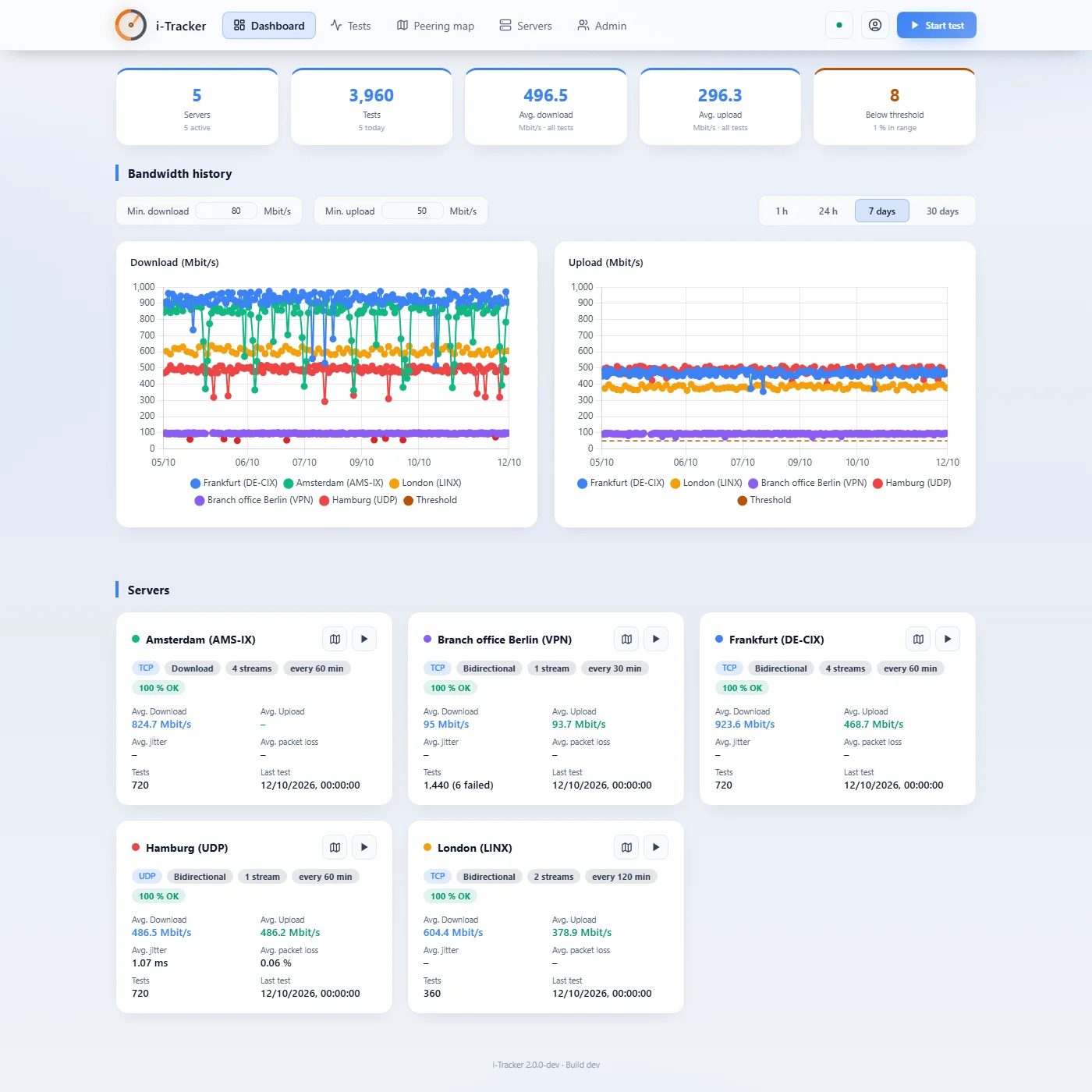
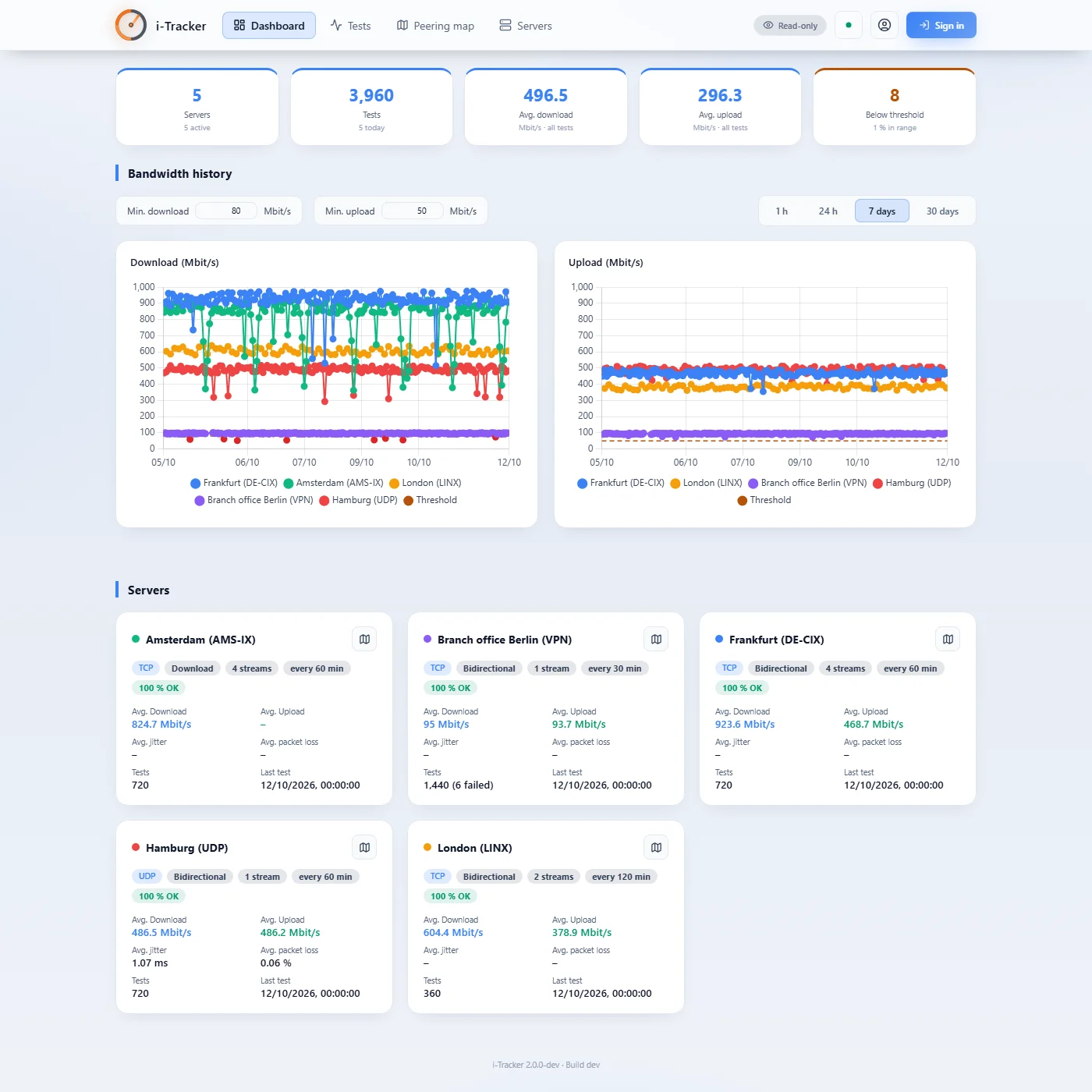
Key figures and the history of all endpoints over seven days, with thresholds. The evening drop towards Amsterdam is a typical peering bottleneck.
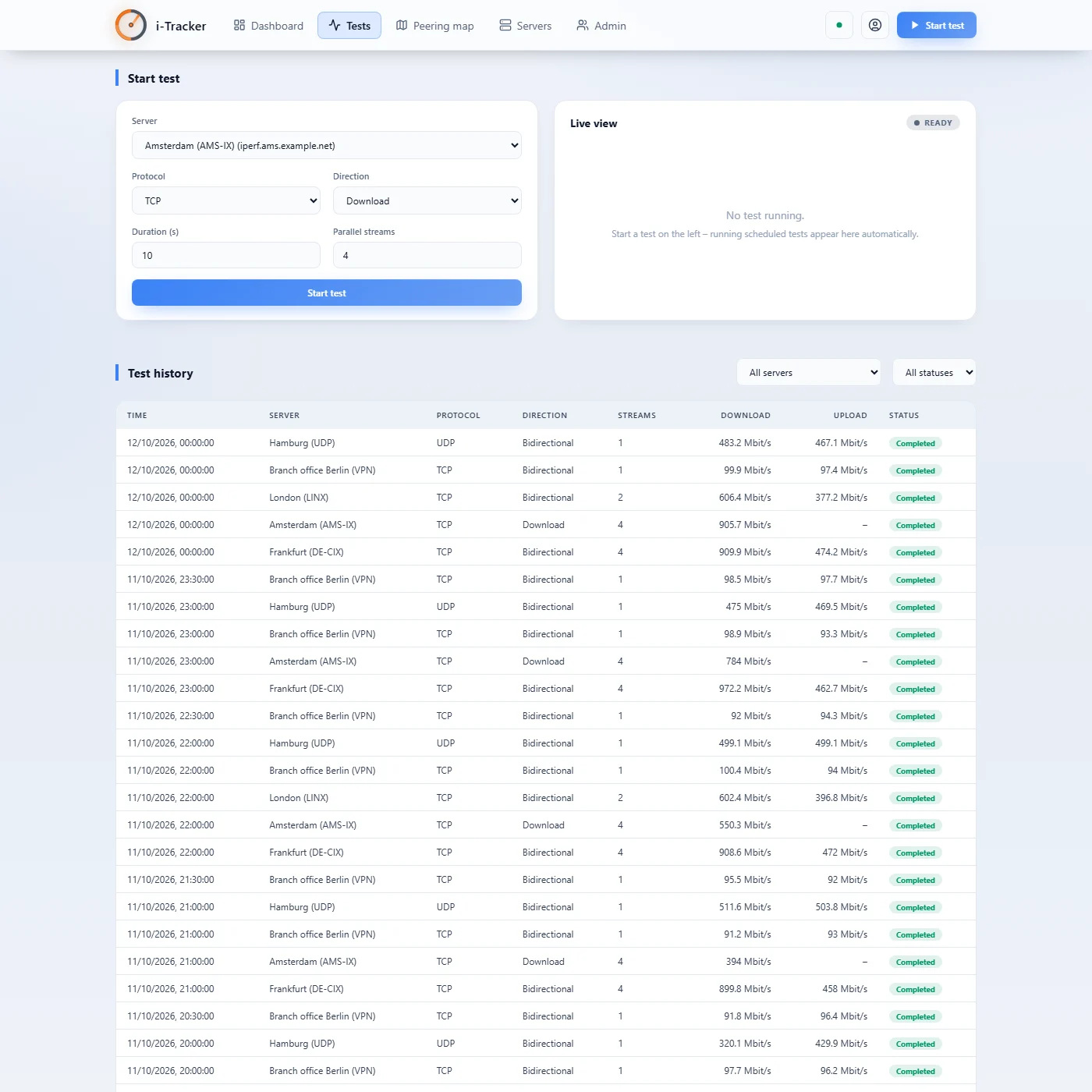
Start tests with any parameters, follow running ones live, and look up every result with protocol, direction, streams and throughput.
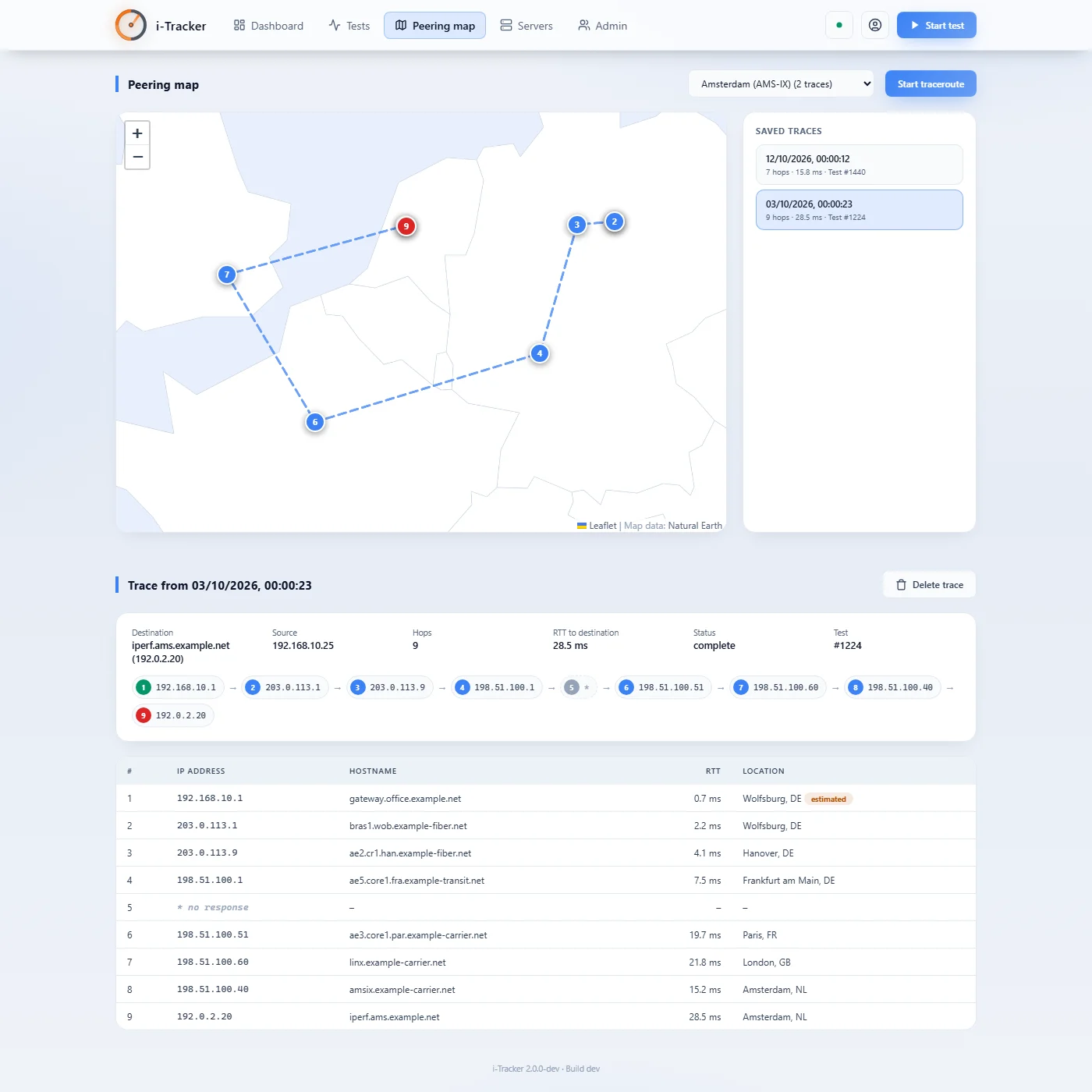
The path of a test across networks and exchange points. Here an earlier detour to Amsterdam via Paris and London; one hop did not respond.
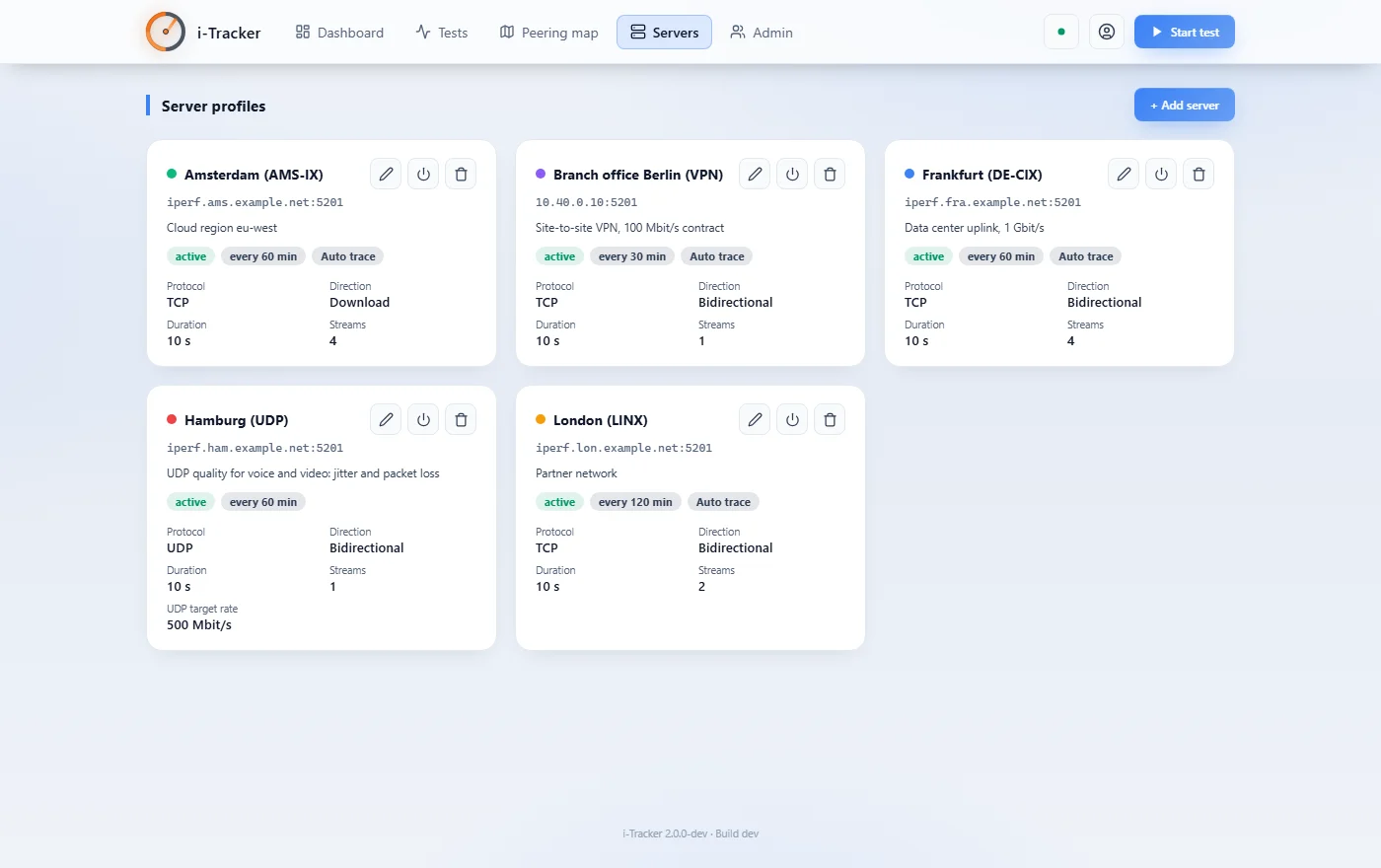
Server profiles with their own interval, automatic traceroute and test parameters, for TCP and UDP.
Without signing in, i-Tracker shows all results but nothing can be changed. With auth.public_read: false, sign-in is required again.
- Platforms
- Windows and Linux, a single executable
- Requirements
- iperf3 version 3.17 or later,
tracerton Windows ortracerouteon Linux - Interface
- German and English, light and dark, mobile-friendly
- Map
- Embedded world map without requests to third-party servers, your own tile server optional
- Default port
8000- Location data
- IP Geolocation by DB-IP (CC BY 4.0), no account needed; optionally MaxMind GeoLite2 with a free MaxMind account
More than a speed test.
Many tools measure the speed of a connection or whether a destination is reachable. i-Tracker measures the throughput to your endpoints continuously and shows the path to them.
- Speed tests
- For example Speedtest by Ookla or Speedtest Tracker. They measure the speed of the connection to the provider’s test servers. i-Tracker measures with iperf3 to any server, including your own, for example between two sites, through a VPN or to the data center.
- iperf3 by hand
- Delivers accurate values, but only at the moment someone measures. i-Tracker runs iperf3 on a schedule, stores every result and makes values below thresholds visible.
- Latency and path
- For example SmokePing, PingPlotter or MTR. They show latency and loss per hop, but not the achievable throughput. i-Tracker combines both: bandwidth via iperf3 and the path via traceroute on a map.
- Network monitoring
- For example PRTG, Zabbix or LibreNMS. They monitor the utilization and availability of devices and interfaces. i-Tracker measures what actually arrives at the end of the path and complements such systems.
i-Tracker
- Source code open under AGPL-3.0
- Anyone who modifies i-Tracker and runs it as a service discloses their changes
- All features without restrictions, no license fee, updates without a license key